

The carrier onboarding process for a dock system means registering carriers and their drivers so they can book appointments, check themselves in at the gate, upload documents, and get scored on compliance automatically. The fastest way to cut gate friction is to standardise your intake requirements and offer link-based pre-registration that needs no account. Run a short pilot, measure dwell time and self-service adoption, and expand from there.
TL;DR:
- Using a standardized pre-registration link and clear, visibility-promoting signage can significantly reduce gate dwell time and improve self-service adoption.
- Accurate system integration is crucial; at least a two-week testing window is recommended to catch data mismatches or timezone issues before going live.
- Proper training materials, support during the initial weeks, and a clear escalation path for exceptions are essential to ensure smooth carrier onboarding and gate operations.
- Tracking key KPIs like dwell time, portal booking rate, and exception rate weekly during rollout helps measure success and identify areas needing improvements.
- Controlling access with role-specific permissions, time-limited codes, and audit trails enhances security and compliance throughout the onboarding process.
Table of Contents
- What should a carrier onboarding checklist actually include?
- Which systems need to talk to your dock scheduler?
- What does the gate check-in workflow look like step by step?
- How do you keep BOL, PO and timestamp data consistent?
- How should you pilot the new onboarding process?
- What KPIs prove the onboarding process is working?
- What access controls keep the gate secure?
- How do you train carriers and drivers on the new process?
- What privacy rules apply to carrier and driver data?
- Why most onboarding rollouts overpromise and underdeliver
- Getting your carrier onboarding process live with DockLedger
- Sources
What should a carrier onboarding checklist actually include?
Most gate delays trace back to one problem: nobody told the driver what to bring. A checklist fixes that, but only if it's specific enough to stop the guard asking follow-up questions at the barrier.
Start with the booking fields you need before a truck ever arrives:
- Appointment ID or reference number
- Purchase order (PO) number
- Bill of lading (BOL) number
- Trailer and tractor registration
- Carrier name and driver name
- Seal number, where applicable
- Expected commodity and pallet or case count
At the gate, the guard verifies a shorter list against what was booked: driver identification, trailer and seal match, and confirmation the BOL matches the PO on file. This is where pre-arrival document upload earns its keep. If the electronic bill of lading and proof of delivery are already sitting in the system before the driver reaches the barrier, the guard is confirming, not typing.
Acceptable document formats should be spelled out on the carrier portal, not left to guesswork. PDF and JPEG uploads for BOLs and hazard declarations work for nearly every carrier's setup, whether they're scanning paperwork from a phone or exporting from a TMS.
Once intake is confirmed, issue a QR code or a short PIN as the appointment confirmation. Drivers screenshot it, print it, or just remember four digits. Either way, it removes the need to search a name in a spreadsheet at 6am.
- Publish the checklist on the booking confirmation email.
- Print the same list as gate signage, visible before the driver reaches the checkpoint.
- Mirror it on the carrier portal's booking page so dispatchers see it too.
Signage matters more than most sites assume. A driver who's read the requirements before arrival is a driver who isn't holding up the queue while they hunt for a seal number.
Which systems need to talk to your dock scheduler?
Five systems typically touch a carrier arrival, and each plays a different role. Get this mapping wrong and you end up with a dock scheduling tool that's just another disconnected spreadsheet.
- Dock/yard scheduling owns appointment slots, door assignment, and arrival status.
- WMS needs to know what's arriving and when, so labour and put away can be planned.
- TMS holds the shipment and carrier record that the appointment should match against.
- Telematics/ELD feeds live ETA data so slots can flex around real delays.
- Kiosk or gate hardware captures the check-in event and any photo evidence.
The integration pattern depends on what you're actually trying to keep in sync. Native integrations between dock scheduling and WMS/TMS prevent double entry and are worth the setup time if your systems support them out of the box. Middleware is the fallback when they don't, but it adds a hop, and every hop is a place where field mapping quietly drifts out of sync.
If full API work isn't realistic yet, don't wait for the perfect integration to start. Flat-file drops on a schedule, or a webhook that fires on appointment confirmation, cover most of the urgent cases: updating a WMS put away plan or pinging a TMS with a confirmed arrival window.
Pro Tip: Run a two-week sync test before rollout. Book ten dummy appointments and check that door assignment, status change, and timestamp all land correctly in every connected system. Catching a field mapping error at this stage is a ten-minute fix. Catching it three weeks into live carrier bookings is a billing dispute.
The DockLedger product tour shows how appointment data, compliance scoring, and evidence capture sit on one record, which is the outcome any integration approach should be aiming for.
What does the gate check-in workflow look like step by step?
A well-run gate follows the same sequence every time, whether the driver used self check-in or walked up to the booth.
- Validate the appointment against the reference number or QR code the driver presents.
- Confirm driver identity against the name on the booking.
- Check documents: BOL, PO, and any hazard declarations against what was uploaded.
- Scan or photograph the seal and trailer number for the evidence record.
- Assign a door based on current dock availability.
- Notify the dock team that a trailer is inbound and where.
- Log the arrival timestamp automatically, not on a clipboard.
Self check-in via QR code or PIN handles most of this before the guard even speaks to the driver. Community documentation on self check-in flows shows how a scanned QR can autopopulate the appointment status and timestamp without manual entry, which is where most of the time saving actually comes from. Geofencing can trigger a check-in prompt automatically as a driver's phone enters the yard, though it's worth treating as optional. Not every driver has location services switched on, and offline-capable scanning hardware should be your fallback for signal dead zones near the dock.
Exceptions still happen. A missing seal number, a mismatched trailer, or a driver with no documents on the app needs a clear escalation path to a shift supervisor rather than a guard improvising a decision.
Pro Tip: Write your exception rules down before go-live, not after the first argument at the barrier. "No BOL, no seal photo" is a policy a guard can enforce consistently. An unwritten judgement call isn't.
How do you keep BOL, PO and timestamp data consistent?
Disputes over detention charges or missed appointments almost always trace back to one thing: two systems disagreeing on the same fact. Standardising a handful of fields removes most of that risk.
- BOL number: same format, same field name, across scheduling, WMS, and TMS.
- PO number: matched at booking, not discovered at the dock.
- Appointment ID: the anchor record every other system references.
- Trailer number: captured once, reused rather than retyped.
- Timestamps: captured automatically at each workflow step, not manually logged.
When a door assignment or status changes, that update has to push back to every system that relies on it. If dispatch and labour planning don't see the new door assignment in near real time, you get a driver sent to the wrong bay and a warehouse team standing at an empty door.
After any integration goes live, run a quick verification: pull ten recent appointments and check the appointment ID, BOL, and timestamp match across every connected system. Mismatches usually come down to one of two things: a field being mapped to the wrong source, or a timezone offset nobody noticed during setup.
How should you pilot the new onboarding process?
Don't try to onboard every carrier on day one. Pick a single dock, or your top ten carriers by volume, and run the new process there first.
- Baseline your current dwell time, check-in duration, and phone-booking rate before changing anything.
- Call your highest-volume carriers personally. A five-minute call gets more adoption than a mass email ever will.
- Hand out a one-page printed guide covering the QR check-in and portal booking steps.
- Staff on-site support for the first one to two weeks so drivers have someone to ask.
- Set a cutover date, giving carriers four to six weeks' notice before phone-only booking stops.
Targeted onboarding calls paired with a firm cutover date consistently outperform a blanket email announcement, largely because carriers default to whatever's easiest unless someone gives them a reason to change.
Pro Tip: Build a short feedback loop into week two of the pilot. Ask your top five carriers what confused them. Fix that one thing before you roll out wider, rather than collecting a list of complaints to address later.
What KPIs prove the onboarding process is working?
Three numbers tell you almost everything: dwell time, portal booking rate, and exception rate per arrival. Track them weekly during the pilot, not just at the end.
- Dwell time: total time from gate arrival to departure.
- Check-in duration: time from arrival to dock assignment.
- Portal booking rate: percentage of appointments booked online versus by phone.
- Exception rate: percentage of arrivals flagging a missing document, mismatched seal, or unscheduled arrival.
Digital gate check-in combined with yard visibility typically converts a manual, radio-call process into automatic door assignment, and that shift shows up directly in reduced dwell time and fewer unscheduled arrivals.
Time-stamped photos and electronic proof of delivery aren't just compliance paperwork. They're what settles a detention dispute in minutes instead of a week of email back-and-forth, and they're what a carrier scorecard should be built on: arrival punctuality, document completeness, and exception history feeding directly into ongoing performance conversations rather than a separate annual review.
What access controls keep the gate secure?
Carrier onboarding isn't just about speed. It's also the point where you decide who's allowed to see what, and who's allowed to enter your yard at all.
Every carrier account should map to a specific role: driver, dispatcher, or carrier administrator. A driver checking in at the gate needs to confirm an appointment and upload a document, not view another carrier's booking history or rate data. Role-based permissions on the carrier portal prevent that kind of accidental (or deliberate) oversharing.
Physical access control matters just as much as portal permissions. A QR code or PIN tied to a specific appointment window is only useful if it expires. A code that works for any trailer, any day, defeats the purpose of having one at all. Geofencing adds a second layer, flagging a check-in attempt from outside the expected yard radius rather than accepting it blindly.
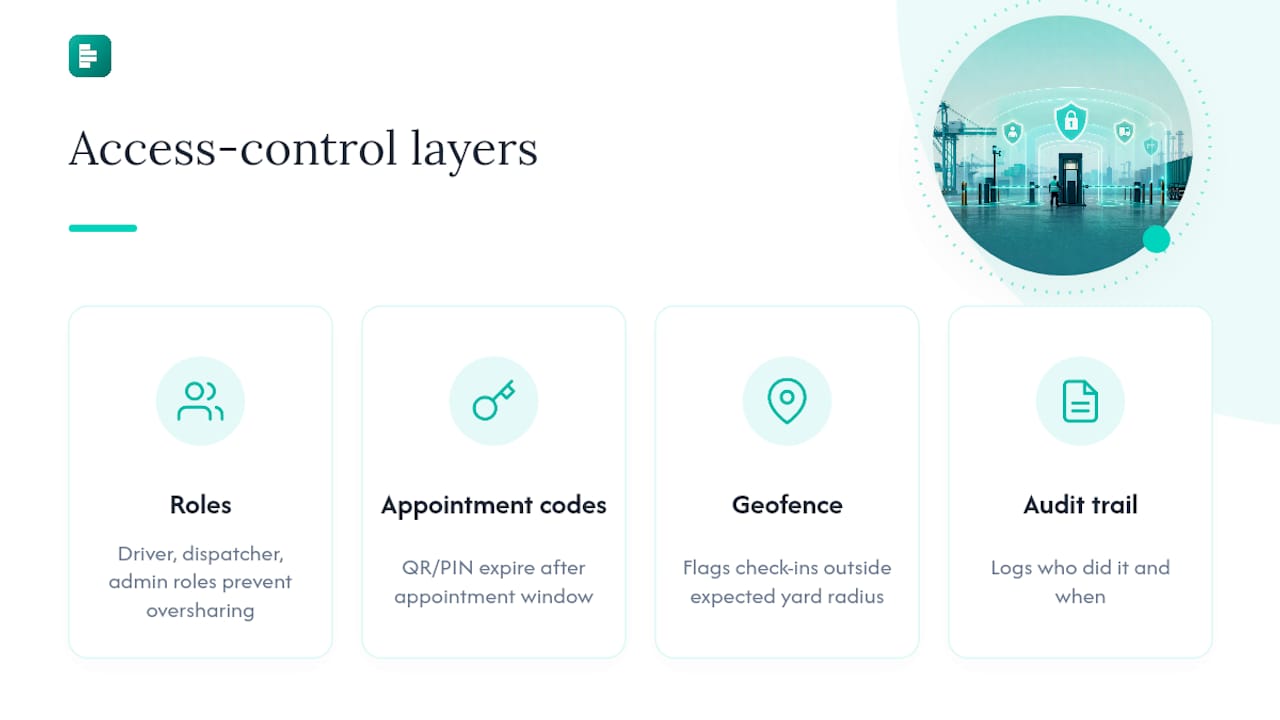
Audit trails close the loop. Every check-in, document upload, and status change should log who did it and when, not just what happened. That record is what you pull when a carrier disputes a compliance score or a detention charge, and it's the difference between a five-minute resolution and a drawn-out argument with no evidence either side.
Multi-factor login for carrier administrators handling sensitive data (rates, contracts, multiple site access) is worth the extra thirty seconds it costs at sign-in. The carriers with the most access are the ones worth protecting most carefully.
How do you train carriers and drivers on the new process?
The best onboarding checklist in the world fails if drivers never see it before they're sitting at your gate. Training has to happen before arrival, not during it.
A one-page printed guide, handed to drivers by their own dispatcher, works better than a lengthy PDF nobody opens. Cover exactly three things: how to book (link, no account needed), what to bring (the document checklist), and how to check in (QR or PIN). Anything beyond that gets skimmed and forgotten.
Video works well for repeat visual steps: scanning a QR code, photographing a seal, finding the right upload button on a phone screen. A ninety-second clip embedded on the carrier portal solves more confusion than three paragraphs of instructions.
Support during the first few weeks matters more than any document. On-site staff who can walk a confused driver through their first self check-in turn a bad first impression into a five-minute fix. After the pilot window, a simple support contact, whether that's a phone number on the gate signage or a message button on the portal, keeps small issues from becoming missed appointments.
Keep training materials living, not static. If your exception rate stays high on one particular field (seal numbers are a common culprit), that's a signal your instructions need a rewrite, not a signal the carriers are being careless.
What privacy rules apply to carrier and driver data?
Carrier onboarding involves handling personal data: driver names, vehicle registrations, sometimes photo identification. That data needs the same discipline any personal information deserves, regardless of how routine the process feels on a busy dock.
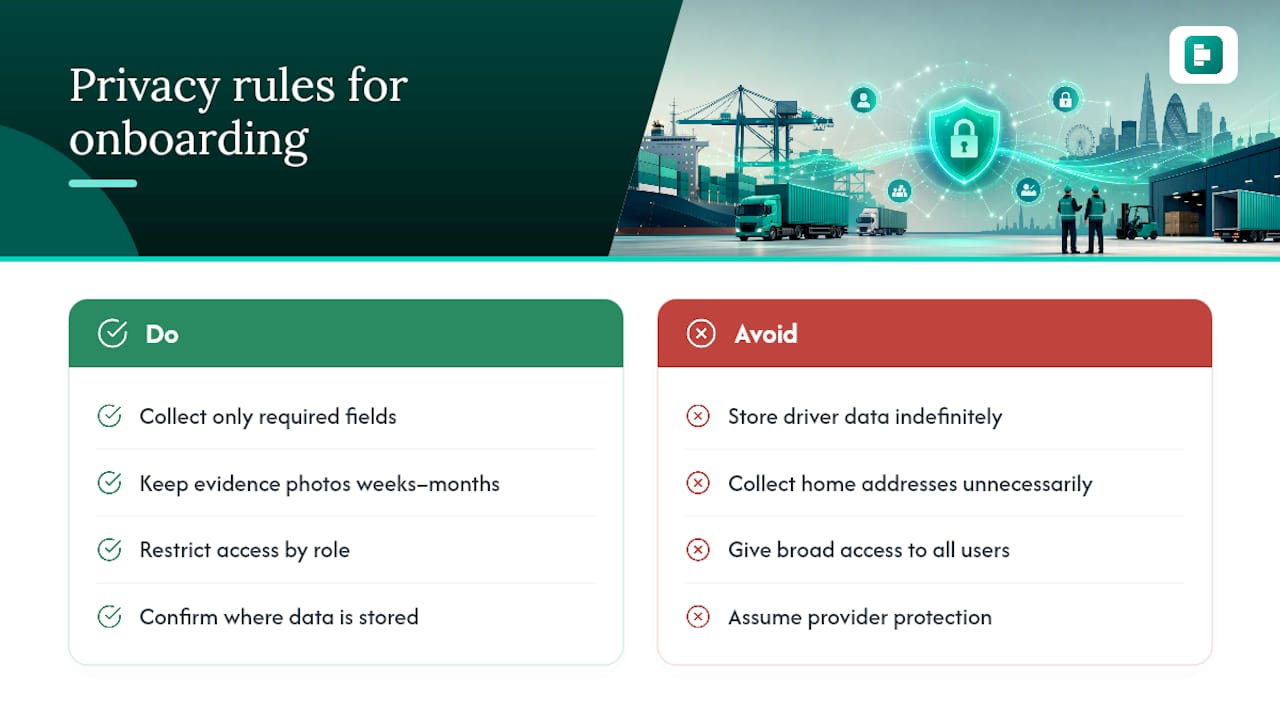
Collect only what the gate workflow actually requires. A driver's name and vehicle details are operationally necessary. A driver's home address almost never is, and if a field isn't used anywhere downstream, it shouldn't be on the intake form in the first place.
Retention policy matters as much as collection. Evidence photos and timestamps need to be kept long enough to resolve a detention dispute or support a billing query, typically weeks to a few months depending on your commercial terms, but indefinite storage of driver personal data creates risk without adding value.
Access to that data should follow the same role-based logic as gate access itself. A dispatcher reviewing carrier performance doesn't need to see a driver's uploaded ID photo; a compliance manager investigating a dispute does. Segmenting who can see what limits exposure if an account is ever compromised.
Any carrier portal handling this kind of data should be transparent about where it's stored and how it's protected. That's worth checking directly with your software provider rather than assuming, since practices vary considerably between platforms built for logistics and generic tools repurposed for it.
Why most onboarding rollouts overpromise and underdeliver
Most guidance on carrier onboarding reads like every carrier will adopt a shiny new portal on day one. That's not how it goes on a real dock. A meaningful share of carriers will keep calling the gate phone out of habit long after the portal launches, and no amount of email nagging changes that on its own.
What actually shifts behaviour is narrower than most guides admit: a minimum viable start of pre-registration, a booking board, and mobile scanning, proven on your highest-volume carriers before you touch anything else. Expect four to eight weeks before adoption feels normal, and thirty to ninety days before dwell time and exception rates show a measurable shift. Anyone promising faster than that hasn't run a pilot on a working dock.
This section will be updated with case studies and carrier testimonials from live DockLedger pilots.
— DockLedger
Getting your carrier onboarding process live with DockLedger
A dedicated dock management platform gives you one place to run everything covered above, built by someone with practical gate operation experience rather than designed from theoretical planning. Live dock scheduling handles the booking side, driver self check-in covers the gate workflow, and compliance scoring can turn onboarding data into an ongoing scorecard rather than a one-off setup task.
Evidence reporting captures timestamped photos and document trails that can help settle detention disputes without prolonged back-and-forth, with scoring models designed to be fair to smaller carriers. If you're weighing up governance questions around data handling, the security details and product roadmap are worth a look before you commit to any platform. The most useful next step is a look at the product tour or a start on the free trial at DockLedger to see how your own intake checklist would run inside it.